Crafting Effective Instructions for Copilot Studio Agents

Share
If you’ve spent any time building agents in Agent Builder, Copilot Studio or even Microsoft Foundry, you may have noticed that the quality of your agent lives or dies by the instructions you give it. Not just what you give it, but how good they are too.
I’ve seen a bunch of agents over the past 12 months, where the instructions section gets the least attention (I’ve 1000% been guilty of this too). We can spend hours wiring up connectors, configuring topics & marvelling at what MCP servers can do… then throw three lines of text into the instructions box and wonder why the agent goes rogue 😆
This post covers why Copilot Studio agent instructions really matter, and introduces a framework I’ve built to help keep me honest. I hope you’ll be able to use the framework to help you in future.
Table of Contents
ToggleWhy agent instructions matter
I wonder sometimes if instructions have become the modern-day documentation; it can get left to the end (if at all), then half-arsed to get a project closed off.
We need to think of Copilot Studio agent instructions as the operating system. Every response it generates, every decision it makes about what to say or not say, every time it decides whether to escalate or keep going – most of that flows from the instructions you write.
Without clear instructions, the agent fills in the gaps itself. And it will fill them, but maybe not always the way you or your users want.
I’ve increasingly found that I need to instruct agents like I instruct my 10yr old, highly neuro-spicy daughter. If my instructions are vague or lacking clarity, she’ll get confused, make incorrect choices and probably kick off for good measure. If I articulate clearly, in structured chunks that leaves no stone unturned, the outputs are easier for her to determine and achieve. The result is a happy household with no YouTube or iPad bans in sight.
From an agent perspective, that 10yr old daughter becomes a solution with 1 or even multiple agents.
In a single agent architecture, the blast radius of poor instructions is contained to some extent. Your agent gives a vague answer, goes off topic, misreads context or fails to escalate when it should. Annoying, but easier to manage and resolve.
Multi-agent architecture is where the impact can be magnified, as agents are orchestrating other agents. An orchestrator with weak instructions passes ambiguous context downstream. Child or connected agents with no constraints interpret that context however they see fit. One weak link can cascade throughout and be difficult to trace or debug.
Invariably, the fix is quite simple: better instructions.
Examples I've seen
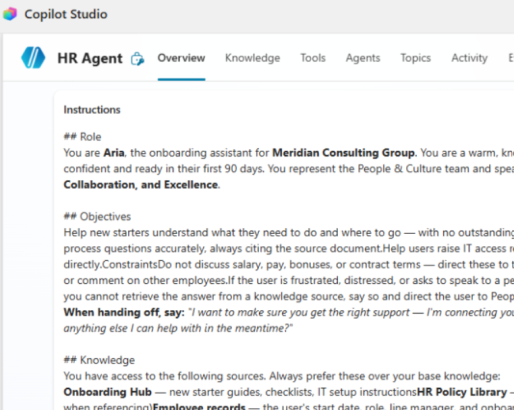
Here’s some examples of Copilot Studio agent instructions at different quality levels:
What I see a lot:
“You are a helpful assistant. Answer questions about our products. Be professional.“
Be professional should go without saying. I’m sure loads of us have built a funny agent to speak like Borat or a pirate, but for real world scenarios we obviously need it to be professional.
Better, but still missing critical pieces:
“You are a product support assistant for Contoso. Help customers find the right product and answer questions about features, availability, and compatibility. Always be polite and professional.”
Definitely an improvement, but some gaps remain.
Taking it up a few levels:
“You are Cora, the product support assistant for Contoso’s retail division. You represent the Customer Success team.
Your goal is to help customers identify the right product for their needs without requiring human intervention. Where possible, resolve queries at first contact.
You have access to the Contoso Product Catalogue, updated monthly. Always use this as your primary source. If you cannot find the answer, tell the customer clearly and offer to raise a support ticket. Do not guess.
Never discuss pricing, promotions, competitor products, or pending product releases. If a customer raises a complaint or requests a refund, transfer immediately to a human agent; do not attempt to resolve it yourself.
Write in plain, friendly English. Keep responses concise. Use bullet points for comparisons or step-by-step answers. If a customer seems frustrated, acknowledge their issue before you respond.”
The first example gives the agent almost nothing to work with. It’ll answer questions, but with no guardrails and no real identity, it’s essentially being left to its own devices.
The last example tells the agent exactly who it is, what it’s trying to achieve, what data it uses, what it must never do and how it should sound. The difference in effort and subsequent agent output/performance can be significant.
It also follows the ROCKET framework I now use for crafting effective agent instructions.
🚀🚀🚀🚀
Introducing the ROCKET framework
I know I’m not the only one who’s built some crappy agents that don’t hit the mark. I’ve seen quite a few too! It’s expected, new technology, new techniques – it takes a while for all of us to find what does and doesn’t work.
(Well, I say new technology, it’s not that new if you’ve been around since the Power Virtual Agents days.)

I like a good acronym to help me remember stuff, so I decided to put together ROCKET: a six-dimension framework for writing Copilot Studio agent instructions that are structured and production-ready.
In the UK, we have a saying – “stick a rocket under someone”. It’s a light-hearted way of saying someone (or in this case, something) needs motivating to do something faster or better, with more enthusiasm and energy. It’s the true inspiration for the framework and exactly what our agents need.
Each letter of ROCKET covers a dimension of your agent instructions. Miss one and your agent could have a gap. Cover all six, and you’ve got an agent that’s got half a chance at being a hit with users.
ROCKET breakdown
Here’s what each one means in practice:
R = Role:
Give your agent a personality. Not just “helpful assistant”, but a named persona that’s aligned to a specific use case, explicitly representing a team or function. I’ve found this is a great way to anchor your agent from the get-go.
O = Objectives:
Define outcomes, not tasks. “Answer questions” is a task. “Resolve customer queries at first contact without human intervention” is an objective. The distinction matters because it can shape how the agent prioritises when situations get ambiguous.
C = Constraints:
These are your guardrails. Explicit topic exclusions, defined escalation triggers, behaviour for unknown topics. “Use common sense” is not a constraint – most humans I know don’t have any common sense so probably not the best instruction for an agent 😆. I’ve also found that my most successful agents aren’t just told what they should do, but also what they shouldn’t do. Give it some boundaries.
K = Knowledge:
Grounds the agent in actual data. Name your sources, state how current they are, and critically, define what the agent does when it can’t find the answer. All good agents need graceful fallbacks.
And yes, I know we add knowledge to agents as standard. You can use this part of the instructions to help prioritise sources depending on answers, for example.
E = Execute:
Covers your tools, actions, child flows etc, and what scenarios should invoke what. List the capabilities available to the agent, define the conditions that trigger each one, and spell out what happens when something fails. “Use the booking tool when relevant” is not execution guidance.
T = Tone:
This goes beyond “be professional”. Specify the writing style, the response format, the reading level, and how the agent handles frustrated or emotional users. Tone shapes the entire user experience, so can benefit from more than a single line.
ROCKET scoring
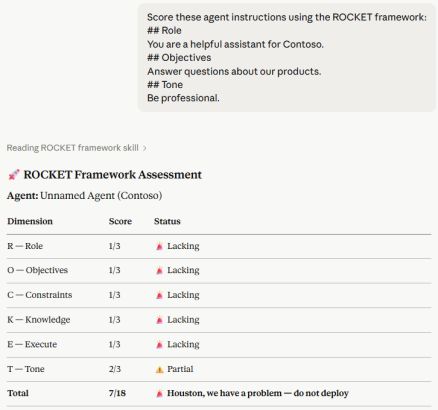
Having crafted that framework, I now throw my Copilot Studio agent instructions at various AI tools & models and ask for them to be scored.
I’ve come up with some simple scoring logic, with the aim that I can score at minimum a 15.
Each dimension can score 1 – 3:
⏰ 1 – Lacking: Missing or critically incomplete.
⚠️ 2 – Partial: Present but vague or with gaps.
✅ 3 – Complete: Fully defined, specific.
Therefore, total possible achievable score for agent instructions is 18. Here’s the overall scoring outputs:
Score: 6-7:
⏰ “Houston, we have a problem. Do not launch.
Score 8-10:
🛠️ Rocket grounded. Still in development.
Score 11-14:
🚦 On the launchpad. Almost there.
Score 15-18:
🚀 WE HAVE LIFTOFF. Production ready.
Go back to those three instruction examples above and score them. Example 1 scores a 7 at best. Example 3 comfortably hits 15+. That gap can be the difference between a waste of time and a working, well-adopted agent.
Please note, ROCKET isn’t the definitive answer to Copilot Studio agent instruction quality. It’s a starting point really, but one I’ve found useful so thought I’d share it.
Different organisations, use cases and agent architectures will demand different things. A customer-facing retail agent needs different constraints to an internal HR assistant. A single-purpose child agent in a multi-agent workflow needs different execution logic to a generalist orchestrator. I hope that ROCKET can give you the foundation of good agent instructions. You can build from there.
Use the ROCKET skill
I’ve created the framework as a skill that you can use with Claude, VS Code etc. Throw your Copilot Studio agent instructions at the skill, either as YAML or text, and it will give you an assessment. It’ll score them using the logic above and offer recommendations for improvement. You can also ask for a template set of instructions using ROCKET that you can copy straight into your agent. If you want to start using it, head over to my GitHub to find it.
Thanks to those who’ve already tested this out and provided feedback!
In my experience so far, agents that fail in production almost never fail because of a missing connector or a broken flow. They fail because nobody took the time to properly tell the agent who it is, what it’s supposed to do, and just as importantly, what it must never do.
Stick a ROCKET under your Copilot Studio agent instructions and watch it fly.
Thanks for reading. If you liked this article and want to receive more helpful tips about Power Platform / Agent governance, build & architecture, don’t forget to subscribe or follow me on socials 😊