
Generate a Unique ID with Power Fx
 By Craig White
The solution in Power Fx involves using the Concat, Sequence, Char, RandBetween & Text functions.
By using Sequence, I can return a table of 4 rows, 1-4: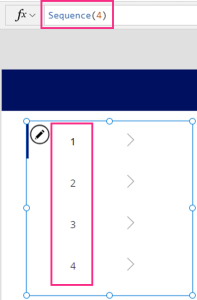
That’s encased within a ForAll, as if to say that for each of those 4 entries, we want to randomise a specific character. We can do this by combining Char and RandBetween. For Chars, see the table in the Microsoft documentation; we only want to target capital letters which are chars 65 through to 90. That takes care of the randomised 4-letter prefix.
We then do the same RandBetween exercise to generate a random 4-digit number between 1000 & 9999. We have to convert this to text though, as the first part of the formula also returns text. We can’t mix string & integer values in the same output.
All of that is embedded within the Concat function, to join both outputs together and with the hyphen in the middle.
Here’s the Power Fx in full:
Please see the .gif below to show the Power Fx in all its working glory:


